JAVASCRIPT REACT, DATA STRUCTURE & ALGORITHMS SUMMARY.
REACT IS A JAVASCRIPT FRAMEWORK OR LIBRARY?
React is a javaScript library, it is not same as framework. Framework provides total solution where React library is not a complete solution and you will need other libraries to sort out any solution. That’s why we can nominate React as a library but not as a framework.
REACT DOM
The Document Object Model is the browsers programming interface that treated HTML and XML documents as tree structures. By using the DOM API, we can change a document structure, style, and content.
RECONCILIATION
It is the process of recursively traversing a tree to know the DOM tag elements of a React application’s component tree. During this process, React goes through the following steps:
- Compares the previous internal instance with the next internal instance.
- Updates the internal Instance (Virtual DOM).
- Updates the actual DOM only at the node where there is an actual change.
COMPONENTS VS ELEMENTS
You can be confused with this two words that are most commonly used in React guides and tutorials out there. As a react learner you must have to understand the difference between this two words.A react component is a template, blueprint or a global definition you can say. This can be either a function or a class with a render method.
A react element is what it gets returned from the components. It’s an object virtually describes the DOM nodes that a component represents. In function component, this element is the object that the function returns and in class components, this element is the object that the component’s render method returns.
REACT COMPONENTS
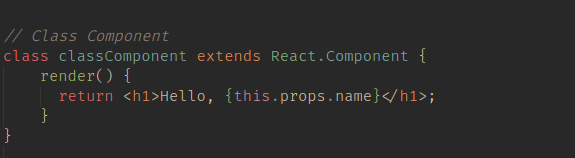
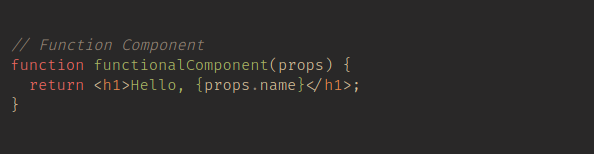
Components are one of the essential features of a React application. They are independent and reusable bits of code. Basically, they are like functions with a different syntax. They take props as inputs and returns the description of the UI as output. In React, there are two types of components.
Class Components
Function Components
REACT FRAGMENT
A common pattern in React is for a component to return multiple elements. Fragments let you group a list of children without adding extra nodes to the DOM.
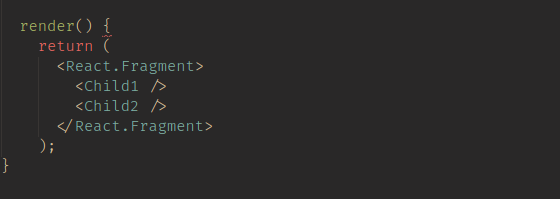
There is also a short and simple syntax for declaring them. It looks like empty tags.

REACT UNDER THE HOOD
React is a JavaScript library used to build user interfaces. There are several tools that power a React app.
- Babel: It is a JavaScript transpiler used to convert code from one syntax to another. It is essential to React as is used to convert JSX into plain JS code.
- JSX: It is an extension to JavaScript, that allows us to write function calls in an HTML like syntax.
- Node.js: It is a JavaScript runtime environment built on Chrome’s V8 JavaScript engine. This allows us to execute JS outside the browser.
- NPM: It is a software register used as a package manager for JavaScript programming language.
BABEL
Bable is a javascript compiler it compiles javascript ES2015+ code into older version javascript code for new or old browser and environment compatible. Babel can do fo you —
Transform syntax
Polyfill features that are missing in your target environment.
Source code transformations.
PROPS IN JSX
In React, ‘props’ is a special keyword that stands for properties and used for passing data between components. There are several ways to define props in JSX.
JavaScript Expressions
String Literals
Props Default to “True”
Spread Attributes
WHY NEED JSX?
JSX allows us to write HTML elements in JavaScript and place them in the DOM without any createElement() and appendChild() methods. JSX converts HTML tags into react elements. You are not required to use JSX, but JSX makes it easier to write React applications.
React uses JSX for templating instead of regular JavaScript. It is not necessary to use it, however, following are some pros that come with it:
It is faster because it performs optimization while compiling code to JavaScript.
It is also type-safe and most of the errors can be caught during compilation.
It makes it easier and faster to write templates, if you are familiar with HTML.
ERROR HANDLING METHODS
There are mainly two types of error handling methods in React. These methods are used in the error boundary mechanism.
static getDerivedStateFromError(error)
This method is useful for rendering a fallback UI after an error is thrown.
componentDidCatch(error, info)
This is useful for logging the error information for debugging purposes.
WHAT IS LIFECYCLE METHOD IN REACT?
React lifecycle methods are the series of events that happen from the birth of a React component to its death. Every component in React goes through a lifecycle of events. I like to think of them as going through a cycle of birth, growth, and death. Lifecyle methods execute in initial rendering or re-rendering phase.
Example:
componentDidMount(), shouldComponentUpdate(), componentDidUpdate() etc.
WHY IS UNIT TESTING NEEDED?
Unit testing helps to make sure the code works correctly. Unit tests are a great way to do regression testing: simply run them every time you change something and make sure nothing breaks. Spotted a bug? Fix it and write a unit test to make sure it doesn’t happen again.
For your identified important parts of code, you need to write unit tests to make sure the code works.
WHY NOT USE TRY / CATCH?
try / catch is great but it only works for imperative code:
try {
showButton();
} catch (error) {
// …
}
However, React components are declarative and specify what should be rendered:
<Button />
Error boundaries preserve the declarative nature of React and behave as you would expect. For example, even if an error occurs in a componentDidUpdate method caused by a setState somewhere deep in the tree, it will still correctly propagate to the closest error boundary.
REACT HOOKS
React hook is a way to use state and side effects in a react function components. By this means that hook allows us to easily manipulate the state of our functional component without needing to convert them class component. Hooks are a new addition in 16.8.
RULES OF REACT HOOKS
We need to understand the react rules before we dive into deep which are fundamental concepts.
- Only call Hooks at the top level. Don’t call Hooks inside loops, conditions, or nested functions.
- Only call Hooks from React function components. Don’t call Hooks from regular JavaScript functions. (There is just one other valid place to call Hooks — your own custom Hooks. We’ll learn about them in a moment.)
REACT HOOK (OPTIMIZING FOR PERFORMANCE)
Every developer always tries to optimize their application so that it can perform well. So there are some techniques to improve performance, like:
- Unnecessary re-render
- Heavy computational calculation in the components repeatedly
- And many more
WHY REACT HOOKS?
React hooks were invented by the React team to introduce state management and side-effect in function component. Benefits of React hooks:
- Unnecessary Component Refactoring
- Side Effect-logic
- React’s Abstraction Hell
- JavaScript Class Confusion reduced
- Reducing the need for render props
USE CALLBACK()
This useCallback() function is very help for optimization. This hook is useful when you have a component with a child frequently re-rendering. It returns a callback function that is memorized and that only changes if one dependency in the dependency tree changes.

USESTATE()
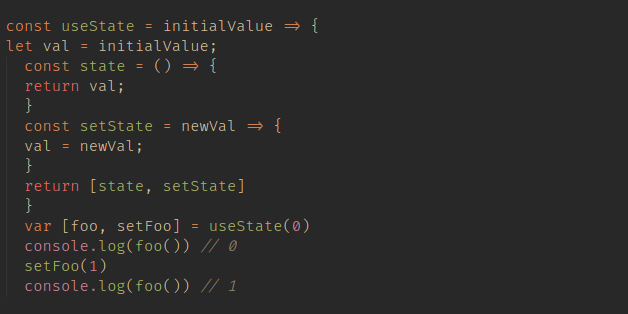
In React Hooks, useState() allows us to have state variables in functional components. It takes the initial value of the state as an argument and returns an array of two items. The first item is the current state and the second item is a function that updates the current state.

We can also make useState() clone using closures to understand how it actually works.
USEEFFECT()
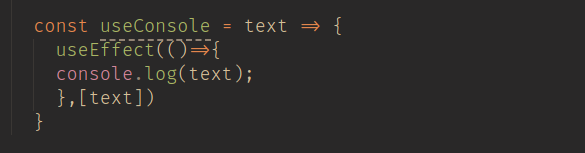
The useEffect() hook lets us perform side effects in function components. It takes a callback function as the first argument and an array of dependencies as the second argument. It executes the callback function if there is a change in any dependency values.

CUSTOM HOOKS
Hooks are nothing but JavaScript functions with some extra rules. Any JS function whose name starts with ‘use’ and that may call other hooks are known as custom hooks. They are useful for reusing stateful logic between components without repeating the same code or adding more components to the tree.
HIGHER-ORDER COMPONENTS
A Higher-Order Component ( HOC ) is an advanced technique to React for reusing component logic. HOC is common in third-party React libraries. A HOC is a function that takes a component and returns a new component. HOCs are not part of the React API. They are a pattern that emerges from React’s compositional nature.
const enhancedComponent = higherOrderComponent(WrappedComponent)
REFS AND USEREF
Refs are a special attribute that are available on all React components. They allow us to create a reference to a given element / component when the component mounts
useRef allows us to easily use React refs. We call useRef (at the top of the component) and attach the returned value to the element’s ref attribute to refer to it.
Once we create a reference, we use the current property to modify (mutate) the element’s properties. Or we can call any available methods on that element (like .focus() to focus an input).
WHY WEB ACCESSIBILITY?
Web Accessibility as a feature has been seen as a very wrong way of design thinking because by default it excludes a large number of web users. People who cannot see or for some reason cannot use a trackpad or a mouse pointer for instance should have as much rights and access as people who can.Web accessibility also benefits people without disabilities, these people may include:
People using mobile phones, smart watches, smart Tvs, and other devices with small screens, different screen modes etc.
Older people with changing abilities due to ageing.
People with “temporary disabilities” such as a broken arm or lost glasses.
People with siyuational limitations such as in bright sunlight or in an environment where the can not listen to audio.
People using a slow internet connection, who have limited or expensive bandwidth.
DON’T USE HOCS INSIDE THE RENDER METHOD
React’s the diffing algorithm which called reconciliation uses component identity to determine whether it should update the existing subtree or mount a new one.
If the component returned from render is identical (===) to the component from the previous render, React recursively updates the subtree by diffing it with
the new one. If they’re not equal, the previous subtree is unmounted completely.
We can also do it inside a component’s lifecycle methods or its constructor.
WHAT ARE DATA STRUCTURES?
Data structures, at a high level, are techniques for storing and organizing data that make it easier to modify, navigate, and access. Data structures determine how data is collected, the functions we can use to access it, and the relationships between data. Data structures are used in almost all areas of computer science and programming, from operating systems to basic vanilla code to artificial intelligence.
Data structures enable us to:
- Manage and utilize large datasets
- Search for particular data from a database
- Design algorithms that are tailored towards particular programs
- Handle multiple requests from users at once
- Simplify and speed up data processing
Data structures are vital for efficient, real-world problem solving. After all, the way we organize data has a lot of impact on performance and usability. In fact, most top companies require a strong understanding of data structures. These skills demonstrate that you know how to manage your data effectively. Anyone looking to crack the coding interview will need to master data structures.
JAVASCRIPT DATA STRUCTURES
BINARY SEARCH TREE:
When we think of a binary search tree, the three things we should think of are:
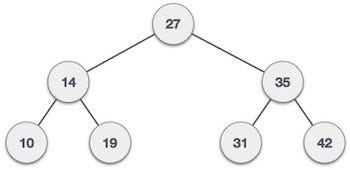
- Root: This is the very top node of a tree structure and does not have a parent.
- Parent: It is a child of a node but also the parent of a node.
- Child: This node is the child of a node and does not necessarily have a child.
In a binary search tree, each node either has zero, one or two children. The child on the left is called the left child, and the child on the right is the right child. In a binary search tree, the child on the left must be smaller then the child on the right.
The core class for a tree would look like:

We’ll also create a Node class to represent each of out nodes.

Let’s implement the add method. I have commented the code very well, but if you find it confusing, just remember that all we are doing from our root and chekong the left and right of each node.

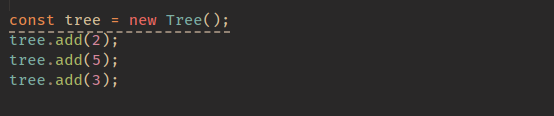
Let;s test our new add method like so:
STACK
This is quite similar to the queue, and you may have heard of the call stack before, which is what JavaScript uses to handle events.
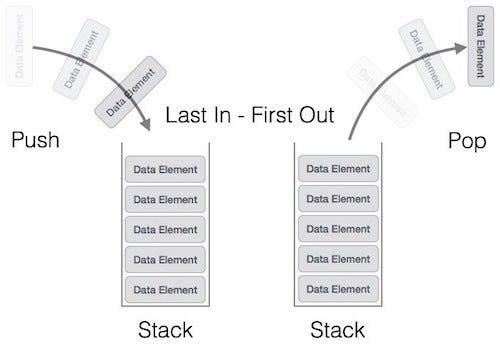
when you have a stack, the last item you pushed on the stack will be the first one removed. This is referred to as last-in, first-out (LIFO). The back button in web browsers is a good example: each page you view is added to the stack, and when you click back, the current page (the last one added) is popped from the stack.
That is enough theory. Let’s get into some code
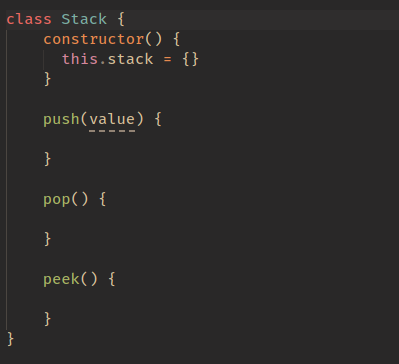
I’ve commented the above code, so hopefully you are with me up to this point. The first method we will implement is the push method.
So let’s think about what we need this method to do:
- We need to accept a value
- We then need to add that value to the top of our stack
- We also should track the length of our stack so we know our stack’s index
It would be great if you could try this yourself first, but if not, the complete push method implementation is below:
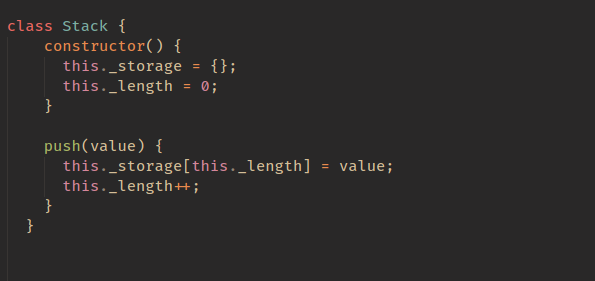
I bet it was easier than you thought. I think with a lot of these structures, they sound more complicated than they actually are.
Now let’s get to the pop method. The goal with the pop method is to remove the last value that was added to our stack and then return that value. Try this yourself first if you can, otherwise just continue on to see the solution:
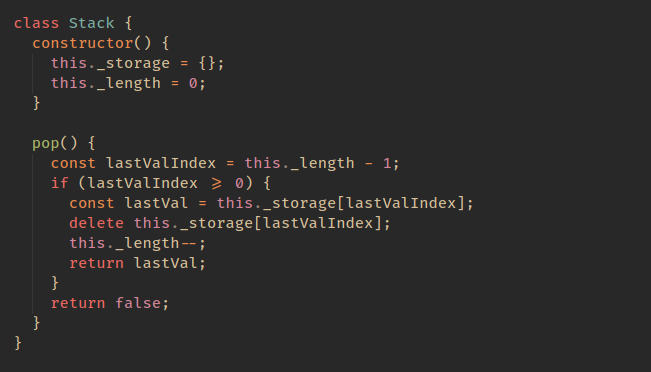
The last thing we need to do is the peek function, which looks at the last item in the stack. This is the easiest function: we simply return the last value. Implementation is:

QUEUE
The key difference between the stack and the queue is that the queue is first-in, first-out (FIFO). There have been a few comments on this article asking why not use an array here, so as a contrast to the above, we will use an array for this data structure.


he two big actions are enqueue and dequeue. We add to the back and remove from the front. Let’s get into implementing a queue to get a better understanding. I had previously used an object here, but I have updated it now to use an array. For the stack data structure, you can also do this approach.
The core structure of our code will look like this:
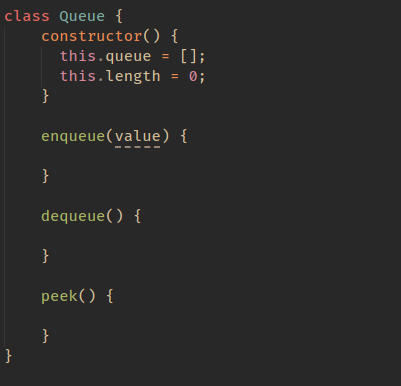
let’s first implement our enqueue method. Its purpose is to add an item to the back of our queue.
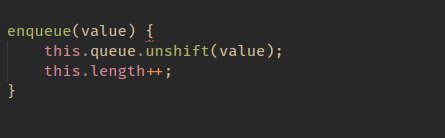
This is quite a simple method that adds a value to the end of our queue, but you may be a little confused by
this.queue[this.length + this.head] = value;
Let’s say our queue looked like this{14 : 'randomVal'}. When adding to this, we want our next key to be 15, so it would be length(1) + head(14), which gives us 15.
The next method to implement is the dequeue method:
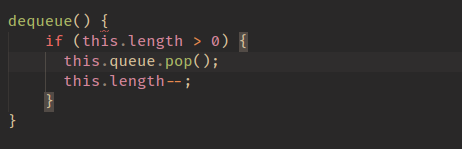
The final method to implement is the peek method, which is an easy one:

LINKED LIST
This is more complicated than our structures above, but together, we can figure it out.

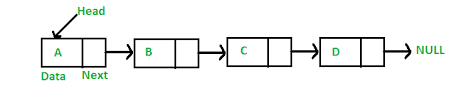
The first question you might ask is why we would use a linked list. A linked list is mostly used for languages that do not have dynamic sizing arrays. Linked lists organize items sequentially, with each item pointing to the next item.
The first thing we are going to create is a Node class.
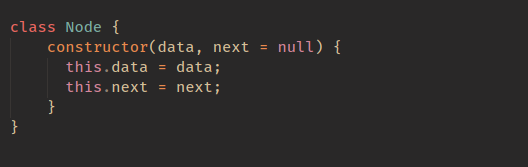
The above represents each node in our list.
With a class for our Node, the next class we need is our LinkedList.
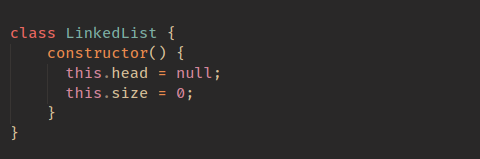
So as we explained above, our LinkedList as a head, which is first set to null (you could add an arg to your constructor to set this if you wanted). We also track the size of our linked list.
The first method we are going to implement is insert; this will add a node to our linked list
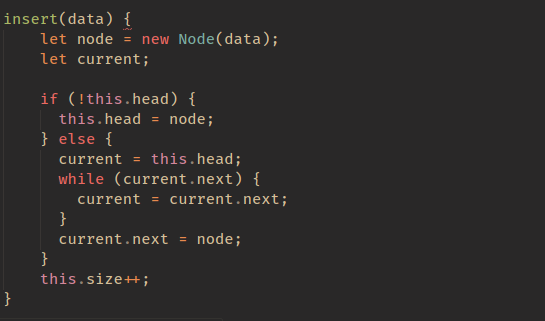
I have commented the code above to make it easier to understand, but all we are doing is adding a node to the end of the linked list. We can find the end of our linked list by finding the node that has a next value of null.
The next method we are going to implement is removeAt. This method will remove a node at an index.
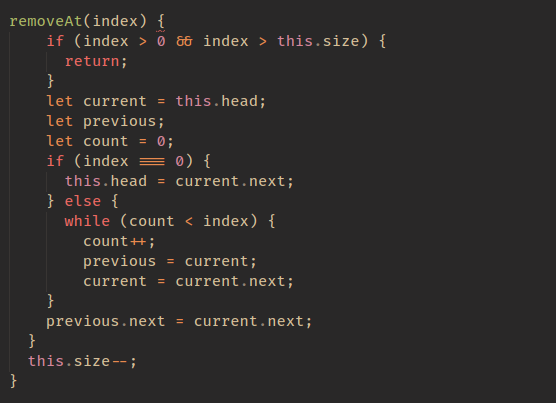
So the method above will remove a node at a specific index. It does this by updating the next value to point at the next node in the list until we reach the index. This means that no node will be pointing at the node at the index, so it will be removed from our list.
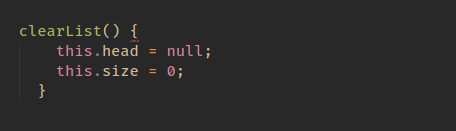
The final (easiest) method left to do is clearList.
HASH TABLE
A hash table is a data structure that implements an associative array, which means it maps keys to values. A JavaScript object is a hash table, as it stores key-value pairs.

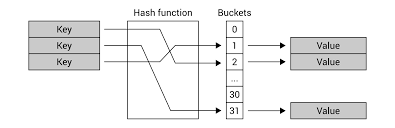
With the hashing function covered, it’s time to talk about how we would implement a hash table.
The three operations we will discuss are insert , get , and, finally, remove.
The core code to implement a hash table is as follows:
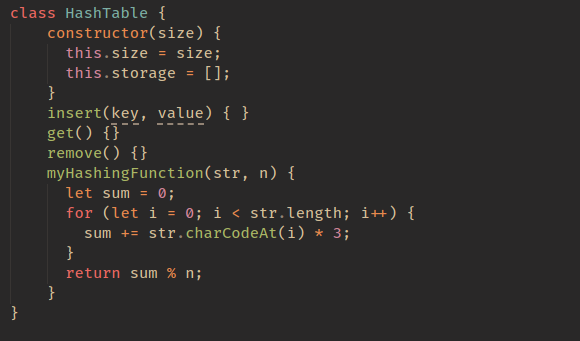
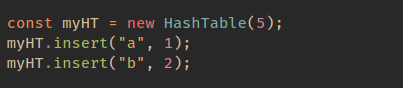
let’s tackle our first method, which is insert The code to insert into a hash table is as follows.
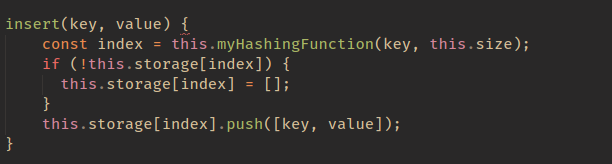
So if we were to call the insert method like so:
Now how would we remove from a hash table?
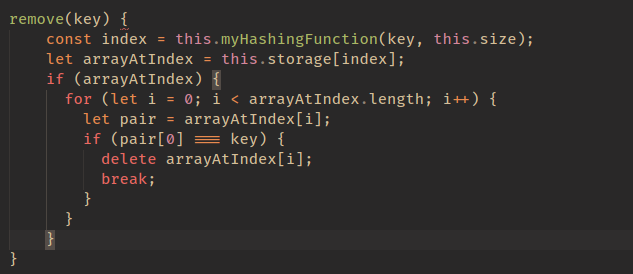
The final method we will implement is the get method. This is the same as the remove method, but this time, we return the pair rather than delete it.

ALGORITHMS IN JAVASCRIPT
FACTORIAL
The factorial of a non-negative integer n, denoted by n!, is the product of all positive integers less than or equal to n. Such as
4! = 4 * 3 * 2 * 1 = 24
For example:

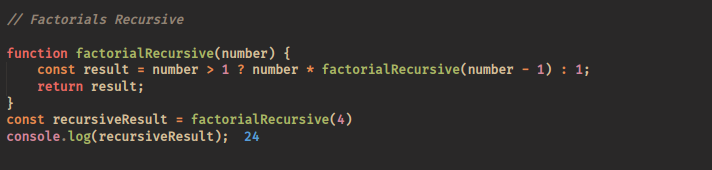
FACTORIAL RECURSIVE
We can find the factorial of a number using recursion. If you’re having trouble to understand the recursive function then try to think about stack. When a function call is placed the function call is placed on the stack and then the other function calls are placed one top of another. Try to draw the call stack on a note book then may be it will be easier to understand.
For Example:
FIBONACCI SERIES
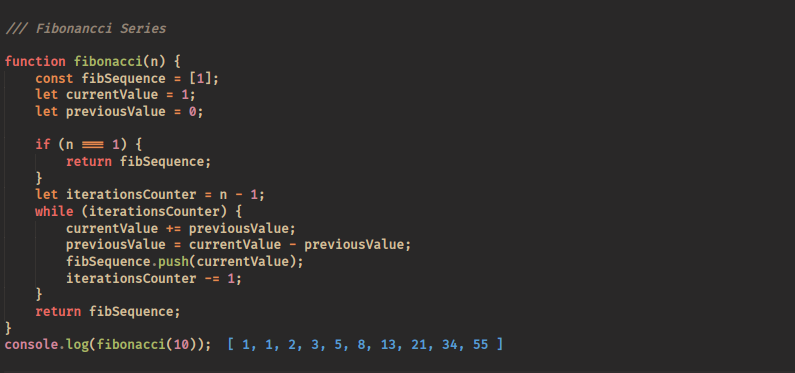
In mathematics, the Fibonacci numbers are the numbers in the following integer sequence, called the Fibonacci sequence, and characterized by the fact that every number after the first two is the sum of the two preceding ones:
[1, 1, 2, 3, 5, 8, 13, 21, 34, 55]
For Example:
LINEAR SEARCH
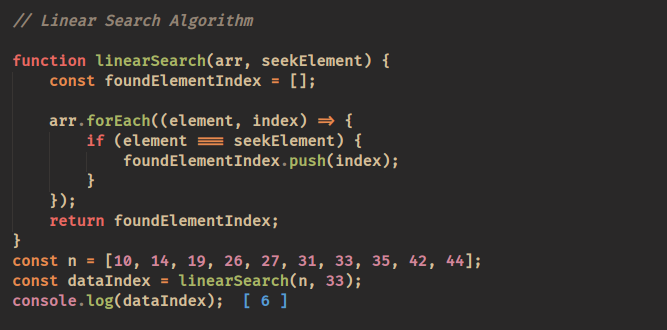
In computer science, linear search or sequential search is a method for finding a target value within a list. It sequentially checks each element of the list for the target value until a match is found or until all the elements have been searched. Linear search runs in at worst linear time and makes at most n comparisons, where n is the length of the list.
For Example:
BINARY SEARCH
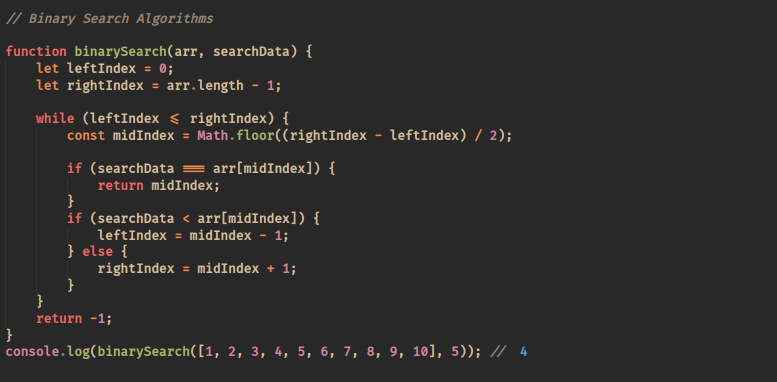
In computer science, binary search, also known as half-interval search, logarithmic search, or binary chop, is a search algorithm that finds the position of a target value within a sorted array. Binary search compares the target value to the middle element of the array; if they are unequal, the half in which the target cannot lie is eliminated and the search continues on the remaining half until it is successful. If the search ends with the remaining half being empty, the target is not in the array.
For Example:
BUBBLE SORT
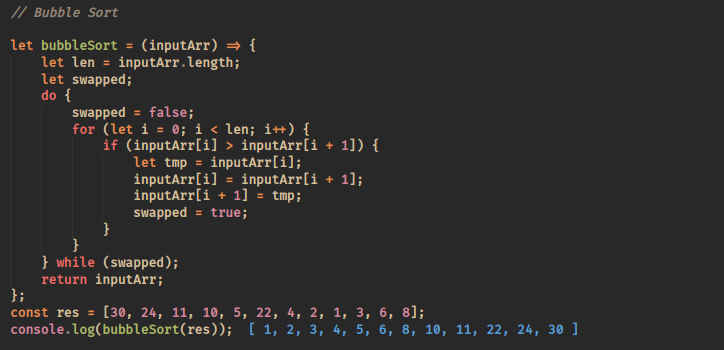
Bubble sort, sometimes referred to as sinking sort, is a simple sorting algorithm that repeatedly steps through the list to be sorted, compares each pair of adjacent items and swaps them if they are in the wrong order (ascending or descending arrangement). The pass through the list is repeated until no swaps are needed, which indicates that the list is sorted.
For Example:
SELECTION SORT
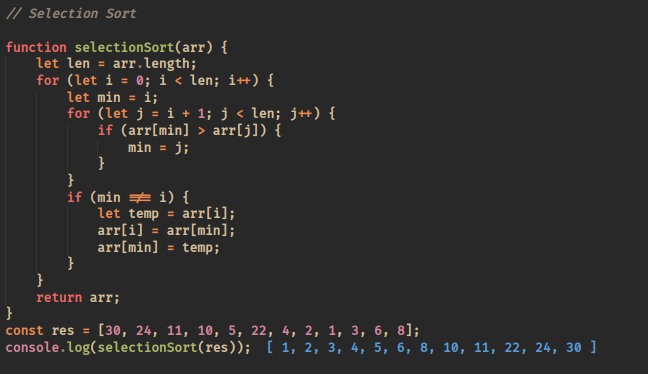
Selection sort is a sorting algorithm, specifically an in-place comparison sort. It has O(n2) time complexity, making it inefficient on large lists, and generally performs worse than the similar insertion sort. Selection sort is noted for its simplicity, and it has performance advantages over more complicated algorithms in certain situations, particularly where auxiliary memory is limited.
For Example:
INSERTION SORT
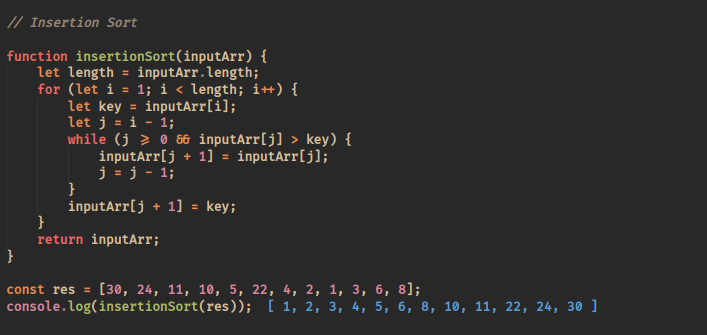
Insertion sort is a simple sorting algorithm that builds the final sorted array (or list) one item at a time. It is much less efficient on large lists than more advanced algorithms such as quicksort, heapsort, or merge sort.
For Example: